The Ring Class
Back to Energy Rings Animation
Purpose: The Ring class represents a single expanding ring with dynamic properties including size, thickness, color, and transparency. This class encapsulates all the data and behavior needed to create and animate a single energy ring.
Visual Example
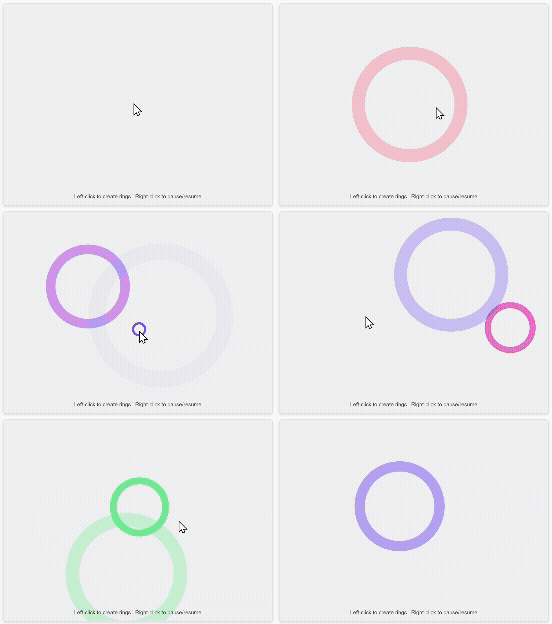
Key Object-Oriented Programming Concepts
- Encapsulation: All ring properties (position, size, color, thickness) are stored as instance variables
- Constructor: Initializes a new ring with specific settings passed as a parameter object
- Methods: Behaviors like
update(),display(),isFinished(), andgetProgress() - State Management: Each instance maintains its own state (diameter, alpha, currentThickness) that changes over time
- Data Hiding: Properties are accessed through methods rather than directly manipulated
Complete Ring Class Source Code
// ============================================
// RING CLASS (Base Class)
// ============================================
// This class defines a single ring and what it can do
// The EnergyRing class will use this as the building block for creating
// sequential pulses
class Ring {
    // Constructor - called when creating a new Ring object
    // Parameters:
    //   x, y: position of ring center
    //   settings: object containing hue, saturation, brightness, thickness, maxDiameter, speed
    constructor(x, y, settings) {
        this.x = x;                                 // X position of the ring center
        this.y = y;                                 // Y position of the ring center
        this.diameter = 0;                          // Starting diameter (will grow)
        this.maxDiameter = settings.maxDiameter;    // Maximum size before disappearing

        // Handle thickness settings
        // If finalThickness < initialThickness, we need to swap them
        // or ensure the mapping still works correctly
        this.initialThickness = settings.initialThickness;
        this.finalThickness = settings.finalThickness;

        // Determine if thickness is growing or shrinking
        // This allows the ring to either expand or contract in thickness
        this.thicknessGrowing = this.finalThickness >= this.initialThickness;

        this.currentThickness = settings.initialThickness;  // Current thickness (will change over time)
        this.speed = settings.speed;                        // How fast the ring expands (pixels per frame)

        // Color for the ring using HSB color mode
        this.hue = settings.hue;                // Hue from control panel
        this.saturation = settings.saturation;  // Saturation from control panel
        this.brightness = settings.brightness;  // Brightness from control panel
        this.alpha = 255;                       // Transparency (255 = fully opaque)
    }

    // Update method - called each frame to grow the ring
    update() {
        // Increase the diameter by the speed value
        this.diameter += this.speed;

        // Fade out as the ring gets larger
        // map() converts diameter range to alpha range (255 to 0)
        this.alpha = map(this.diameter, 0, this.maxDiameter, 255, 0);

        // Calculate current thickness based on diameter
        // As the ring expands from 0 to maxDiameter,
        // thickness changes from initialThickness to finalThickness
        // This works correctly whether finalThickness is larger or smaller than initialThickness
        // If finalThickness > initialThickness: ring gets thicker (energy pulse effect)
        // If finalThickness < initialThickness: ring gets thinner (reverse effect)
        this.currentThickness = map(this.diameter, 0, this.maxDiameter,
                                   this.initialThickness, this.finalThickness);
    }

    // Display method - draws the ring on the canvas
    display() {
        // Set stroke (outline) color with transparency using HSB values
        stroke(this.hue, this.saturation, this.brightness, this.alpha);

        // Set the thickness of the ring outline using the current thickness
        // This value changes dynamically as the ring expands
        strokeWeight(this.currentThickness);

        // Don't fill the circle (just draw the outline)
        noFill();

        // Draw the circle (ring) at position x, y with current diameter
        circle(this.x, this.y, this.diameter);
    }

    // Check if the ring has finished expanding
    isFinished() {
        return this.diameter > this.maxDiameter;
    }

    // Get the progress of this ring as a value between 0 and 1
    // 0 = just started, 1 = reached max diameter
    // Used by EnergyRing to determine when to spawn the next ring
    getProgress() {
        return this.diameter / this.maxDiameter;
    }
}
Instance Variables (Properties)
| Property | Type | Description |
|---|---|---|
x |
Number | X coordinate of the ring's center |
y |
Number | Y coordinate of the ring's center |
diameter |
Number | Current diameter of the ring (starts at 0, grows over time) |
maxDiameter |
Number | Maximum diameter before the ring is considered finished |
initialThickness |
Number | Starting stroke thickness in pixels |
finalThickness |
Number | Ending stroke thickness in pixels |
currentThickness |
Number | Current stroke thickness (changes dynamically) |
speed |
Number | Growth rate in pixels per frame |
hue |
Number | Color hue value (0-360) |
saturation |
Number | Color saturation value (0-100) |
brightness |
Number | Color brightness value (0-100) |
alpha |
Number | Transparency value (0-255, fades as ring expands) |
Methods (Behaviors)
| Method | Returns | Description |
|---|---|---|
constructor(x, y, settings) |
- | Initializes a new Ring with position and configuration settings |
update() |
void | Updates the ring's state each frame (grows diameter, adjusts thickness and transparency) |
display() |
void | Renders the ring on the canvas using p5.js drawing functions |
isFinished() |
Boolean | Returns true if the ring has exceeded its maximum diameter |
getProgress() |
Number | Returns a value between 0 and 1 representing expansion progress |
Example Usage
// Create settings object with ring configuration
let ringSettings = {
    hue: 51,                // Gold color
    saturation: 100,
    brightness: 100,
    initialThickness: 2,
    finalThickness: 50,
    maxDiameter: 400,
    speed: 2
};

// Create a new Ring instance at position (400, 300)
let myRing = new Ring(400, 300, ringSettings);

// In the animation loop:
function draw() {
    background(0, 0, 94);

    myRing.update();      // Update ring state
    myRing.display();     // Draw the ring

    // Check if ring is finished
    if (myRing.isFinished()) {
        console.log("Ring has completed its expansion!");
    }
}